
Watching TikTok is a common source of entertainment, and sometimes you may want to save a video you created, a clip you have permission to use, or another public post for offline reference. TikTok may provide its own save option, but that copy can include TikTok branding or a watermark. SSSTikTok provides a simple browser-based way to process a supported public TikTok link and show the formats actually available for that post, including MP4 video and, when supplied by the source, MP3 audio.
On this page
What Is SSSTikTok?
SSSTikTok is an online TikTok downloader for supported public links. Paste a TikTok URL into the downloader and the tool validates the address, requests the media information from the configured provider, and shows the download formats returned for that specific post.
The service can handle standard TikTok videos, available audio tracks, photo posts and slideshows when the connected provider returns those media types. Public Story links can also work when the provider supports them. If a clean video source is available, SSS TikTok can show a no-watermark option; if audio is available, it can show an MP3 option.
There are many TikTok downloaders online, so this site does not rely on unverified claims such as “the world’s best” or invented user counts. The goal is a clear interface, useful format choices, realistic explanations of quality and limits, mobile support, and no SSSTikTok account requirement.
How Do You Use SSSTikTok?
The normal workflow is copy, paste and choose a result. You do not need to install a desktop program or create an SSSTikTok account.
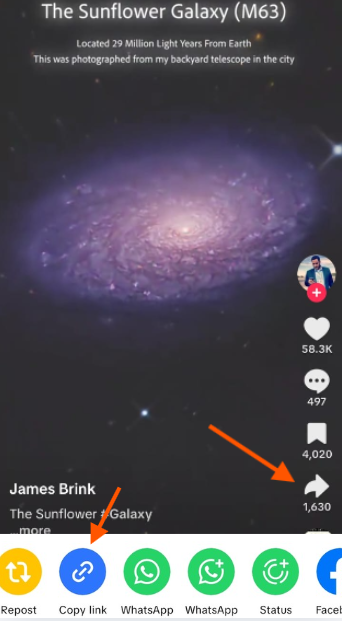
Copy the TikTok link
Open TikTok, go to the public video or supported post you want to save, tap Share, then choose Copy link. This copies the TikTok URL to your clipboard.
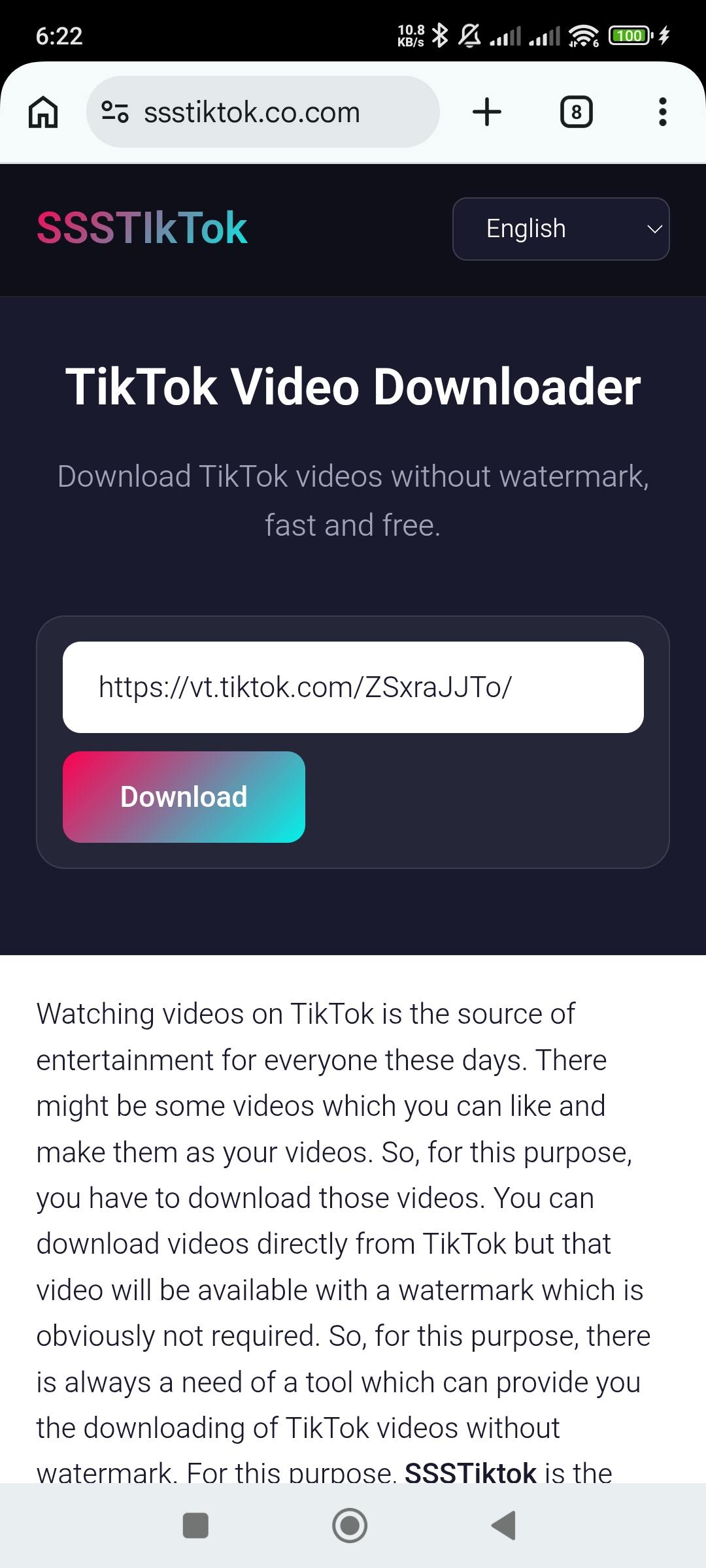
Paste the URL into SSSTikTok
Open SSSTikTok and paste the copied URL into the downloader. You can also use the Paste button when your browser grants clipboard permission.
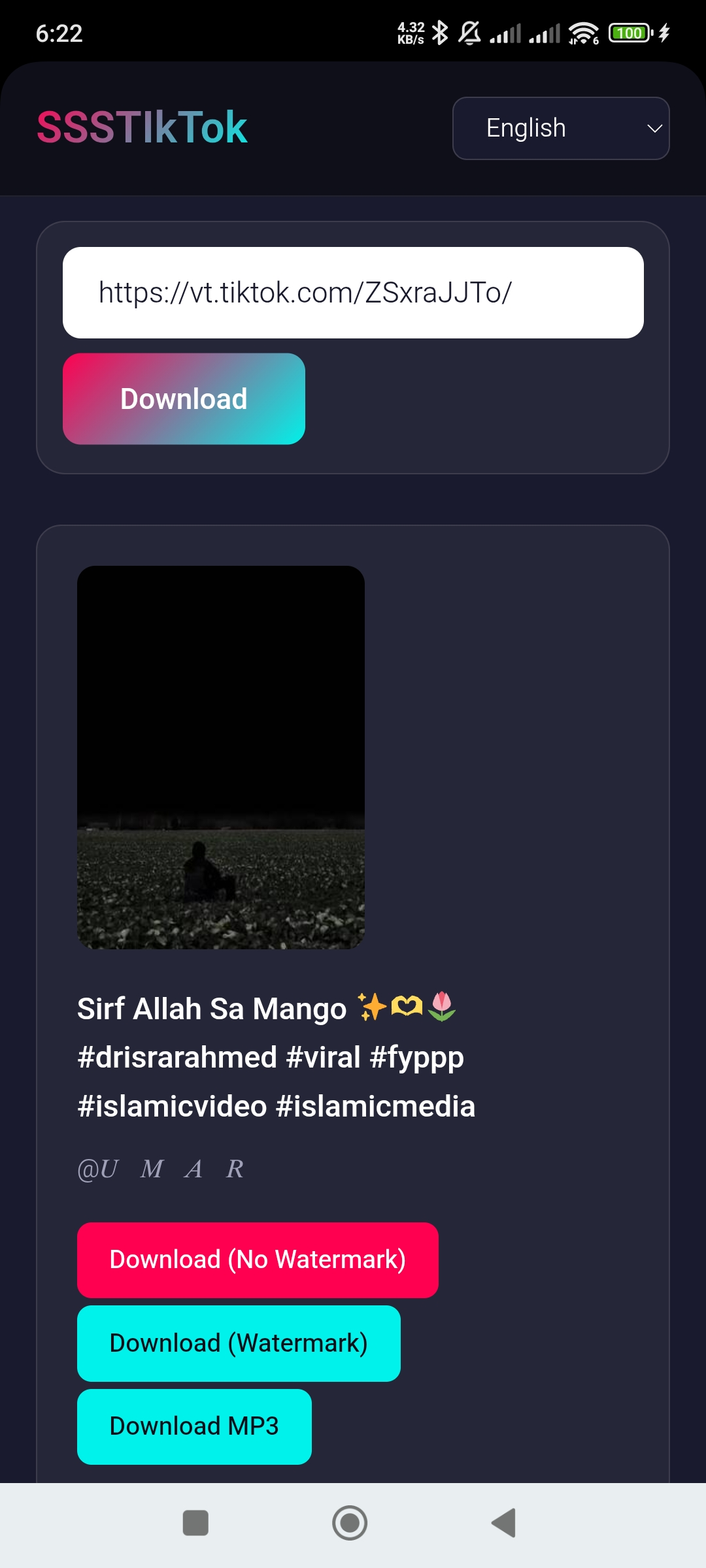
Choose a format and download
Press Download. The tool requests the available media and shows the choices returned for the post, such as no-watermark MP4, watermarked MP4, MP3 audio or images.
The step illustrations explain the workflow. Their appearance may differ from your current app or browser.
Key Features of SSSTikTok
The original idea is simple: make TikTok downloads easy. The rebuilt version keeps that simplicity while adding clearer information about what the tool can and cannot do.
Fast and Easy Downloads
Paste a supported link, request the media and choose a result. Processing time depends on your internet connection, TikTok availability and the connected provider.
MP3 and MP4 Options
Supported posts can return video and a separate audio track. The audio format depends on the source and whether conversion is available.
Available Source Quality
The tool displays an available source returned by its provider. It cannot create detail missing from the original media or guarantee a specific resolution.
No-Watermark Video
When the provider returns a clean video source for a public TikTok post, SSSTikTok displays a no-watermark download option.
Free Repeat Use
The website does not require a paid SSSTikTok account. Provider quotas, abuse protection or temporary technical limits can still apply.
Clean Interface
The downloader is designed without misleading download buttons or intrusive overlays around the main action, making the real controls easier to identify.
Direct Download Choices
Available results appear in the same interface instead of forcing visitors through unnecessary intermediate pages before the actual media options.
Beginner-Friendly Design
The input, Paste button, Download button, progress messages and result controls are designed to be understandable even on a first visit.
Useful for Content Creators
Creators can save their own public posts or permitted reference media for editing and archiving. Downloading a file does not transfer another creator’s rights.
Which TikTok Formats and Media Types Can You Download?
Not every TikTok URL exposes the same files. SSSTikTok reads the result for the link you submit and only displays options the provider actually returns.
| Media / format | What it is for | Availability |
|---|---|---|
| MP4 without watermark | A clean video file when a clean source is available. | Depends on the source and provider. |
| MP4 with watermark | A TikTok-branded version when returned as an alternative. | May be available for some posts. |
| MP3 / audio | The available audio track associated with a supported post. | Shown only when an audio URL is returned. |
| Photo post images | Individual images from supported TikTok photo posts or slideshows. | Depends on the post and provider. |
| Public Story media | Story media when a supported public Story URL can be resolved. | Provider dependent; not guaranteed. |
How Does SSSTikTok Work?
The front end is simple, but the downloader performs several checks before it creates result buttons.
How Can You Use SSSTikTok on Android, iPhone, Windows or Mac?
Because the tool runs in a modern browser, the basic process is similar on phones, tablets and computers. The main difference is where your browser stores the downloaded file.
Which TikTok Links Does SSSTikTok Support?
SSSTikTok recognizes normal public TikTok URLs and common TikTok short-link domains such as vm.tiktok.com and vt.tiktok.com. Short links can be resolved to their final TikTok destination before the media request is sent.
Tip: Copy the link directly from TikTok’s Share menu whenever possible. Incomplete, manually edited, expired or non-TikTok URLs are more likely to fail validation.
What Does “HD” Mean for a TikTok Download?
Resolution, frame rate, bitrate and sound depend on the actual media returned. A provider may supply a compressed version. The tool does not restore missing detail or guarantee an original camera file.
How Does SSSTikTok Handle Privacy and Safety?
You do not need an account or a TikTok password. Submitted links are sent to enabled media providers, and temporary results are cached. Opening a result can connect your browser to a media host. No account does not mean no data processing.
Public links only: Private accounts, deleted posts, unavailable media, region-restricted items or links the configured provider cannot resolve may not be downloadable.
Why Might a TikTok Download Not Work?
- The link is incomplete or not a TikTok URL. Copy it again from TikTok’s Share menu and retry.
- The post is private, deleted or unavailable. A downloader cannot retrieve media the source or provider cannot access.
- A short link has expired or cannot be resolved. Open the TikTok post and copy a fresh link.
- The connected API has reached its quota. The site owner can test RapidAPI from the SSSTikTok settings screen.
- The provider changed its response format. The theme supports several common structures, but providers can still make breaking changes.
- Your browser blocks the final download. Check browser download permissions and the Downloads panel.
How Can Content Creators Use SSSTikTok Responsibly?
SSSTikTok can be useful when you want to save your own TikTok uploads, keep copies for editing, collect references you have permission to use, or archive media for another legitimate purpose. A clean copy can be convenient when a creator needs their own original post without an overlaid watermark.
Removing a watermark does not make another creator’s work yours. If the media belongs to someone else, respect the creator’s rights, TikTok’s terms and any applicable copyright or licensing rules before reposting, editing, redistributing or using it commercially.
How Do We Test SSSTikTok?
A working download button is more useful than a marketing claim. Testing covers standard TikTok video URLs, TikTok short links, no-watermark video when available, watermarked alternatives, audio results, photo posts, invalid links and unavailable posts.
Testing should also cover current versions of major browsers on mobile and desktop. When a provider changes, the WordPress diagnostics screen can test the configured RapidAPI host and endpoint before visitors encounter the problem.
Conclusion
SSSTikTok is a browser-based TikTok downloader for supported public links. It is built to save available TikTok videos in MP4, provide a clean no-watermark version when the source exposes one, offer a watermarked alternative when available, and show MP3/audio or image choices for supported posts.
The idea remains simple: find a TikTok post you are allowed to save, copy its link, paste it into SSSTikTok and choose a format returned for that post. The rebuilt site adds clearer format information, mobile support, troubleshooting, privacy details, testing information and realistic explanations of quality and limitations. SSSTikTok remains focused on TikTok rather than pretending to download from unrelated services such as Facebook.